

I’ve read every ‘how to build a marketplace’ guide on the internet.
Here’s what I keep finding: they’re all written for developers or platform vendors pitching their own product. Nobody writes it from the perspective of a founder who actually needs to build one, run one, and make money from one.
I’ve spent the last few years working alongside the team behind Dokan, the WordPress plugin powering 40,000+ active multi-vendor marketplaces worldwide. I’ve seen what founders get wrong before launching their marketplace. I’ve seen the mistakes that kill most new marketplaces in year one. And I’ve seen what the successful ones did differently.
This is that guide.
By the end, you’ll know how to validate your niche before spending a penny, which platform decision you can’t undo, how payment splitting actually works, and how to get your first 10 sellers and first 10 buyers without running a single ad.
TL;DR:
Building a multi-vendor marketplace in 2026 comes down to three paths: SaaS platform (under 60 minutes, revenue share pricing), WordPress and plugin (3 to 8 hours, $700 to $2,500 in year one), or custom development (6 to 18 months, $60,000 to $300,000+). For most founders, SaaS is the fastest way to validate before committing to larger infrastructure. But the platform is never what makes or breaks a marketplace. What does: validating your niche with real sellers and buyers before building, setting up automated payment splitting from day one, recruiting quality sellers over quantity, and having a plan to break the cold start problem before you launch publicly.
Bottom line: Validate your niche first. Find 10 sellers and 10 buyers who say yes before spending anything. Then start with FlyCommerce’s 14-day free trial to build and test your marketplace with zero upfront cost.
What Most Guides Get Wrong About Building a Marketplace
Here’s the problem with most marketplace build guides.
They start with the platform. ‘Use this tool. Follow these steps. Launch next week.’ They walk you through a technical setup, show you some screenshots, and send you on your way.
Then you launch. And nothing works the way you expected.
Why? Because the platform was never the hard part.
The hard part is everything that comes before you touch a platform. Whether anyone actually wants to sell on your marketplace. Whether buyers will pay. Whether your commission rate makes sense. Whether your payment setup can actually split money between three vendors in one transaction without you doing it manually.
These are the things that kill most new marketplaces. Not the platform choice.
This guide covers all of it, in the right order.
| This guide is written from the marketplace founder’s perspective. If you’re building a platform for other sellers to sell on, not a store to sell your own products, this is for you. |
Before You Build Anything: Validate Your Niche First
Most failed marketplaces didn’t fail because they chose the wrong platform. They failed because they built before they validated.
A marketplace has to work for two sides simultaneously: sellers and buyers. Getting one without the other is the oldest problem in marketplace history. Founders call it the chicken-and-egg problem. I call it the fastest way to spend six months building something nobody uses.
Here’s the rule: before you write a line of code, sign up for any platform, or design a single page, do this first.
The 10 Sellers and 10 Buyers Test
Find 10 people who match your seller profile. Ask them directly: ‘If a marketplace existed for X, would you list your products on it?’ Not ‘would you consider it.’ A hard yes or a hard no.
Then find 10 people who match your buyer profile and ask: ‘Would you buy from a platform like this?’
If you can’t get 10 clear yes answers on each side, the niche is wrong or the offer is wrong. Fix that before you build. This conversation takes a week. Rebuilding a marketplace because nobody showed up takes six months.
How to Choose a Niche That Can Win
Horizontal marketplaces, the ones that try to sell everything, almost always lose to Amazon. You can’t outspend them. You can’t out-assort them.
Vertical marketplaces win. Reverb owns used musical instruments. Faire owns wholesale-to-boutique retail. StockX owns sneakers. Etsy owns handmade and vintage. Every one of them started with a specific, underserved niche and expanded from there.
Good niche signals:
- Sellers currently use inefficient channels to sell, such as Facebook groups, phone calls, or spreadsheets
- Buyers struggle to find what they want in one place
- The transaction is repeatable, not a one-off purchase
- Average order value is high enough to justify a 10% to 20% commission
- No well-funded platform specifically owns this category yet
Bad niche signals:
- You would be the first seller in the category with no existing market to tap
- The category is dominated by Amazon, eBay, or a platform with strong network effects
- Low average order value makes commission economics unworkable
- Sellers can already reach buyers easily through existing channels
Define Your Revenue Model Before You Build
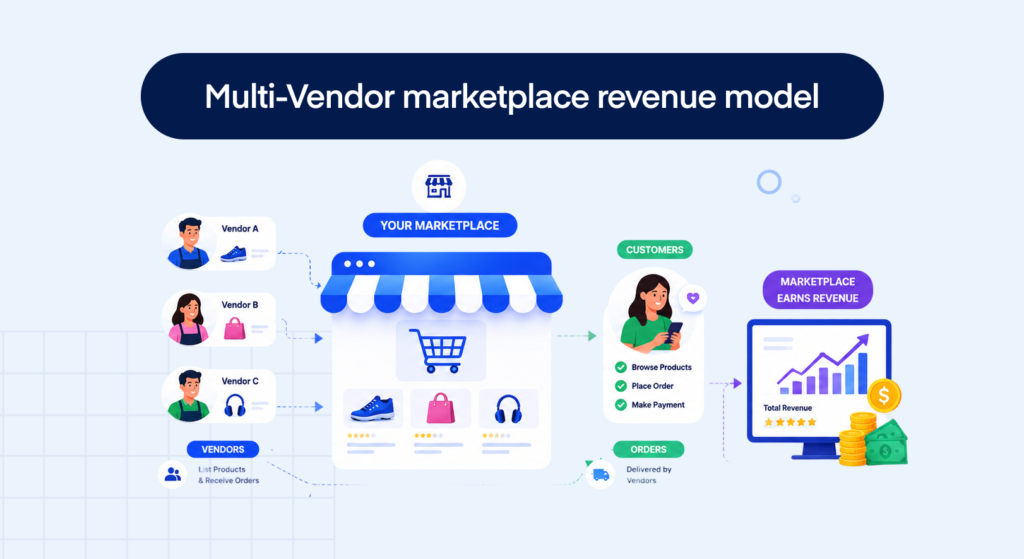
Your revenue model is not a detail to figure out after launch. It shapes every other decision you make, including which platform you choose, how you onboard sellers, and what your commission dashboard needs to do.
The three models that work:
- Commission model: you take a percentage of every sale. Standard range is 5% to 30% depending on category. Amazon takes 8% to 15%. Etsy takes 6.5%. This is the most common model because it aligns your revenue with your sellers’ success.
- Vendor subscription model: sellers pay a monthly fee to list on your marketplace, regardless of sales. This gives you predictable revenue from day one. Most successful marketplaces combine a base subscription with a reduced commission rate.
- Listing fee model: sellers pay per product they list. Etsy charges $0.20 per listing on top of commission. Works best for high-value or collectible goods.
Most successful marketplaces use a combination. Start with commission only, add subscription tiers once you have enough sellers to justify the offer.
| For the full breakdown of every marketplace revenue model with real commission benchmarks by category, read: How Do Multi-Vendor Marketplaces Make Money? |
The 3 Ways to Build a Multi-Vendor Marketplace (And What Each Actually Costs)
Once you’ve validated your niche and defined your revenue model, you need to choose your build path. This is the decision you can’t easily undo. Migrating a marketplace from one platform to another is expensive, disruptive to your sellers, and almost never worth it.
There are three realistic paths in 2026. Here’s what each one actually looks like, including the costs most guides skip.
Option 1: Build From Scratch (Custom Development)
You hire a development team to build a fully custom marketplace. This is how Amazon, Etsy, and Airbnb were built. It gives you complete control over every feature, every integration, and every design decision.
Real costs:
- Development: $50,000 to $250,000 or more depending on complexity and where your team is based
- Timeline: 6 to 18 months from kickoff to launch
- Ongoing engineering: $2,000 to $10,000 per month to maintain and improve the platform
- Payment infrastructure alone typically adds 3 to 4 months to the timeline
| The gotcha: Custom builds always cost more than the estimateEvery custom marketplace project runs over time and over budget. Payment splitting, seller dashboard logic, and tax compliance are the three most common sources of scope creep. If your budget is under $200,000 and your timeline is under 12 months, custom development is almost certainly the wrong choice right now. |
When it makes sense: you have a genuinely novel marketplace model no existing platform can support, you have the funding, and you have the patience for a 12-month build before seeing a single transaction.
Option 2: WordPress and Plugin (Self-Hosted)
You install WordPress, add a marketplace plugin like Dokan, and host everything on your own server. This is the most popular path for founders on a tight budget who want flexibility and control.
Real costs:
- Hosting: $20 to $100 per month
- Dokan Pro plugin: from $149 per year
- SSL, theme, page builder: $100 to $500 one-time
- Initial setup time: 3 to 8 hours if you’re comfortable with WordPress
- Developer if you’re not technical: $500 to $5,000 for setup
| The gotcha: The maintenance overhead most founders don’t budget forWordPress marketplaces need ongoing maintenance: plugin updates, security patches, hosting management, performance optimisation. Budget 3 to 5 hours per month minimum, every month. Most first-time founders underestimate this completely and end up spending more time managing the server than growing the marketplace. |
When it makes sense: your budget is under $1,000, you have some technical comfort, and you want hands-on control of your hosting environment.
| Already running a Dokan WordPress marketplace and thinking about moving to a managed SaaS? Read: WooCommerce Marketplace Alternative, when it makes sense to switch. |
Option 3: SaaS Marketplace Platform (Best for Most Founders)
You sign up for a cloud-hosted SaaS platform that handles everything: hosting, security, backups, payment infrastructure, seller management, and the marketplace logic. You focus entirely on building your business.
FlyCommerce is built for this path. Here’s what it looks like:
- Setup time: under 60 minutes to a live, working marketplace
- Technical skill required: zero. No server, no plugins, no code
- Hosting, daily backups, and security monitoring: included
- Vendor management, commission automation, and payment splitting: built in
- Pricing: from $20/month for Shop (Launch plan) or $48/month for Marketplace (Basic plan). All plans include a 14-day free trial. Revenue share decreases as you scale: 2% on Launch, down to 0.5% on Advanced and Scale tiers. All features included on every plan.
The tradeoff: you’re within the platform’s feature set. For most marketplace businesses, especially in the first two to three years, this is exactly the right tradeoff. You get to market faster, validate the business model sooner, and only invest in custom infrastructure once you have proven demand.
For businesses that need more or want a fully custom solution, FlyCommerce’s Enterprise tier is built around your specific business needs.
| See how fast you can launch. FlyCommerce gets you to a live marketplace in under 60 minutes. No server, no plugins, no code. Start with a 14-day free trial. |
| Factor | FlyCommerce | WordPress + Dokan | Custom Build |
| Setup time | Under 60 min | 3 to 8 hours | 6 to 18 months |
| Monthly platform cost | From $20/mo + rev share | $149/yr plugin | N/A (custom) |
| Technical skill | Zero | Moderate | Full dev team |
| Payment splitting | Built in | Plugin dependent | Custom engineering |
| Tax automation | Avalara certified | Third-party plugin | Custom build |
| Hosting and backups | Included | You manage it | You manage it |
| Free trial | 14 days | No | No |
| Year 1 all-in estimate | $20/mo + % of revenue | $700 to $2,500 | $60,000 to $300,000+ |
How to Build a Multi-Vendor Marketplace: The 6-Step Process
You’ve validated your niche. You’ve chosen your platform. Now here’s the exact build process, in the order that matters. Do not skip steps. The sequence is intentional.
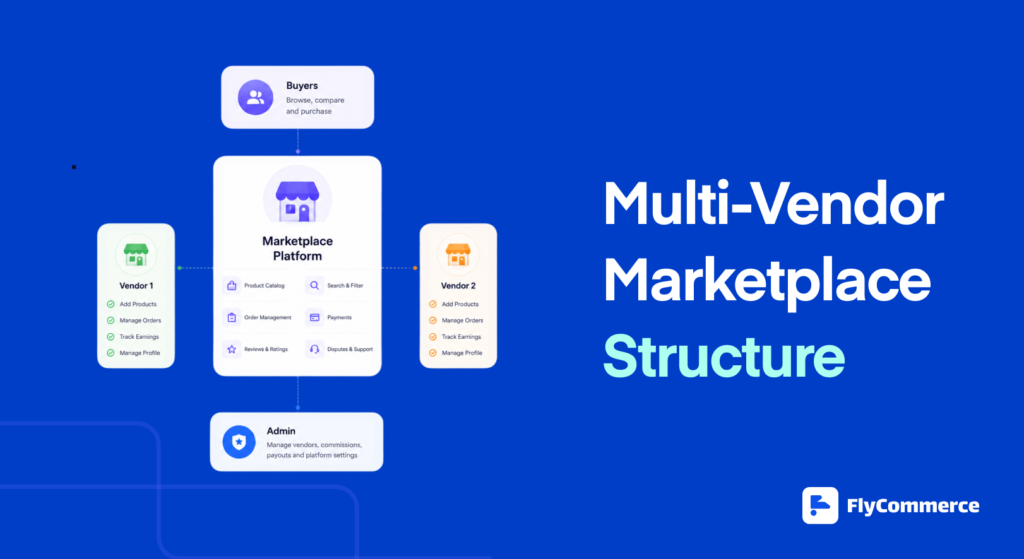
Step 1: Define Your Niche and Revenue Model
If you’ve done the validation work above, you already know your niche and have a draft revenue model. This step is about locking both in before you configure anything.
Write down three things before you touch the platform:
- What specific category of products or services will sell on your marketplace
- Who your first 10 sellers will be and how you’ll reach them personally
- Your commission rate and whether you’ll offer a seller subscription plan on top
The commission decision matters more than most founders realise. Too low and you can’t fund growth. Too high and your best sellers leave for a competitor. Working range by category: 5% to 10% for high-volume, low-margin goods. 10% to 15% for standard product marketplaces. 15% to 25% for services and rentals. 20% to 30% for digital products.
| For the full breakdown of marketplace revenue models and commission benchmarks by industry, read: How Do Multi-Vendor Marketplaces Make Money? |
Step 2: Choose Your Platform and Set Up Your Storefront
You’ve already seen the three build paths. Once you’ve chosen, the setup steps on FlyCommerce look like this:
- Connect your custom domain. Your marketplace should live on your own brand URL from day one, not a platform subdomain
- Set your marketplace name, logo, and brand colours using the drag-and-drop builder
- Configure your product category structure so buyers can navigate clearly
- Set your homepage layout for first-time visitors
This takes most FlyCommerce users two to three hours. Get it to ‘good enough to be credible’ and move on. Do not spend two weeks perfecting the design before you have a single seller or buyer. You can improve the design after you have traction. You cannot recover from spending three months on aesthetics and skipping seller acquisition.
Step 3: Set Up Payment Splitting and Tax
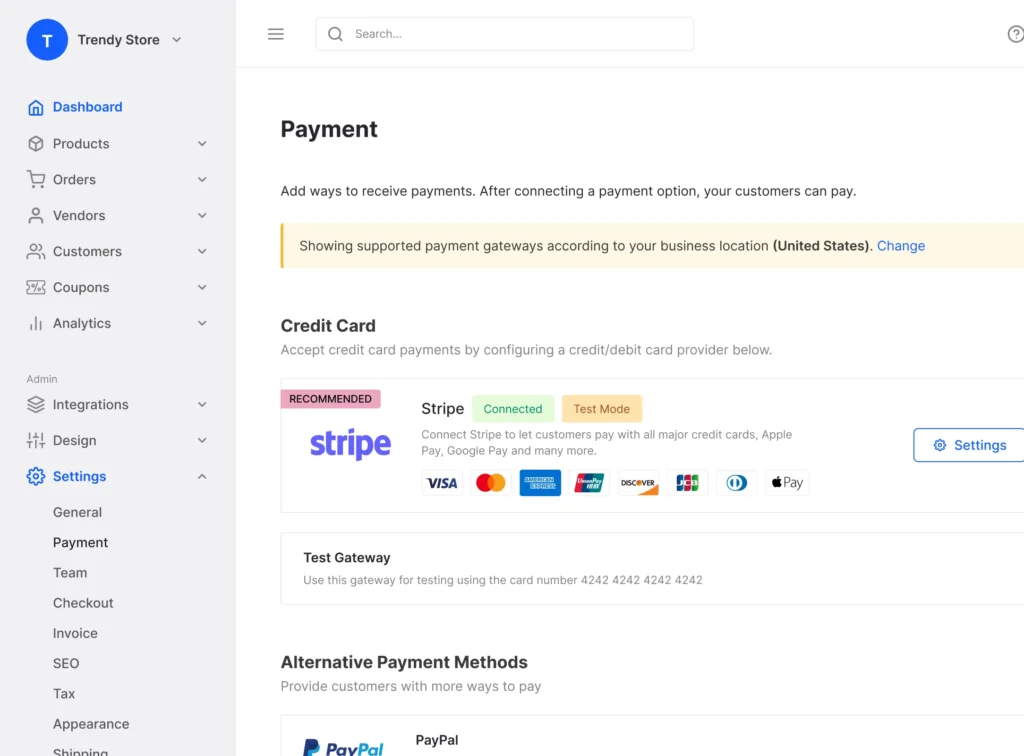
This is the most technically important step. It is also the one most guides gloss over with ‘connect your payment gateway and you’re done.’
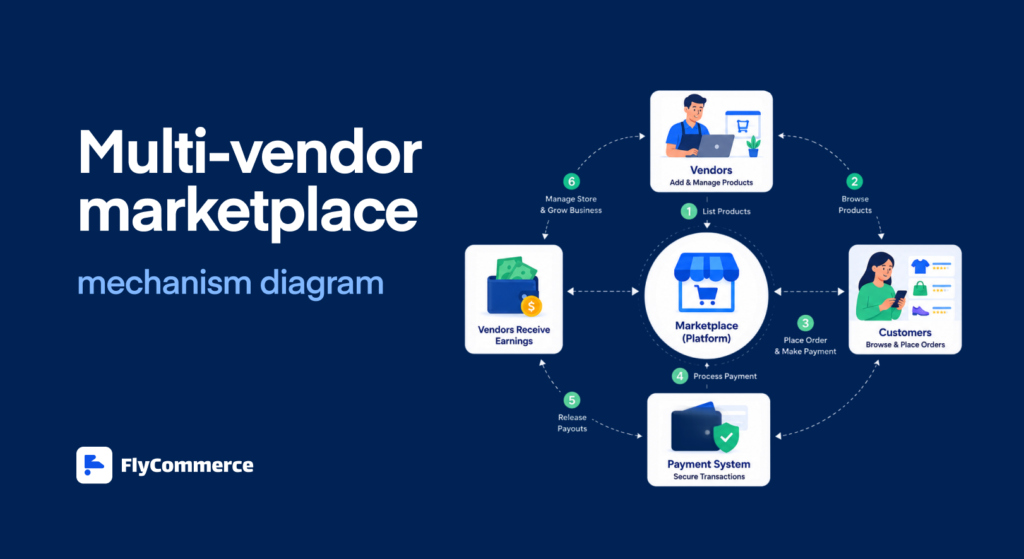
You’re not done. Here’s what actually needs to happen when a buyer pays $100 on your marketplace for products from two different sellers:
- The payment splits automatically between the two sellers based on their individual products
- Your commission is deducted from each seller’s portion before payout
- The correct sales tax for each item in each jurisdiction is calculated and withheld
- A payout to each seller’s bank account is queued on your payment schedule
- A transaction record is generated for accounting and compliance on both sides
That all happens in one transaction. Without the right infrastructure, you’re doing every one of those steps manually.
| The gotcha: This is why most self-built marketplaces fail at scaleFounders build a marketplace, launch, get their first 50 orders, and then discover they’ve been manually reconciling seller payouts in a spreadsheet every week. Stripe Connect handles this automatically but setting it up from scratch is weeks of engineering. On FlyCommerce, it’s configured in the dashboard. |
On FlyCommerce, payment splitting happens automatically through Stripe and PayPal integrations. Commission is deducted at the point of sale. Seller payouts are queued automatically. Tax is calculated in real time via Avalara AvaTax. FlyCommerce is the only multi-vendor marketplace SaaS with both Avalara certifications: Sales Tax Calculation and Document Management for B2B exemption certificates. No other multi-vendor marketplace SaaS holds both. Sharetribe has neither. Yo!Kart is uncertified. CS-Cart’s Avalara integration has known issues.
Here’s what that looks like in practice. A buyer purchases three items: a $60 product from Seller A and a $40 product from Seller B. FlyCommerce calculates your commission on both in real time, withholds the correct sales tax for the buyer’s location, queues a payout to each seller, and records the transaction for accounting. The buyer gets one receipt. You get your commission automatically. The sellers get paid on schedule. Zero manual work.
For B2B marketplaces specifically, the ECM certification handles exemption certificate management automatically. When a business buyer has a tax exemption, the certificate is captured, stored, and applied to the right transactions without anyone touching a spreadsheet. This is why FlyCommerce’s Avalara certification matters for enterprise marketplace founders in particular: it’s not a nice-to-have. It’s the difference between your marketplace being compliant from day one and your finance team manually managing exemptions at scale.
Most marketplace platforms either skip this entirely or bolt on a third-party tax plugin that breaks when your transaction volume grows. FlyCommerce built it into the platform from the ground up. That’s the technical foundation that lets you scale without hiring a tax compliance team.
Step 4: Configure Seller Onboarding and Approval
Seller onboarding is the process by which people apply to join, get reviewed, and gain access to their dashboard. Getting this right matters more than most founders think. A confusing onboarding flow is one of the top reasons sellers abandon a marketplace before listing their first product.
On FlyCommerce, you configure:
- Application form: what information do you require before approving a seller? Keep it to seven fields or fewer
- Approval workflow: manual review, auto-approve, or tiered based on seller category
- Subscription plan: which plan does each approved seller start on?
- Commission rate: global default, per category, or per seller
- Dashboard access: what can sellers see, edit, and manage?
The standard that works: seven-field application form maximum, approval decision within 24 hours, a three-step setup guide sent immediately after approval covering how to upload their first product, how to check their dashboard, and who to contact if something doesn’t work.
Quality beats quantity at this stage. One seller with 50 well-photographed, well-described products sets the tone for your entire marketplace. Fifty sellers with one weak listing each makes the platform look empty.
| For the complete seller onboarding playbook, read: How to Onboard Vendors to Your Marketplace. |
Step 5: Launch With Your First 10 Sellers

Before you open to the public, you need sellers with real listings. Not placeholder products. Not demo content. Real products, real photos, real prices, from real sellers.
Your first 10 sellers almost always come from personal outreach. Not ads. Not a landing page. A direct message or call to someone you know or have been introduced to.
What to offer your first cohort:
- Free or discounted subscription plan for 3 to 6 months
- White-glove onboarding where you personally help them set up their first listings
- Featured placement on your homepage at launch
- A direct line to you for any issue with a same-day response commitment
These first sellers become your case studies. Their products become your social proof. Their feedback becomes your product roadmap. Treat them like co-founders of the marketplace, not just users of a tool.
| The gotcha: Don’t open publicly with fewer than 20 live listingsAn empty marketplace doesn’t just fail to convert buyers. It actively signals to every buyer who lands on it that this platform isn’t serious yet. Set a minimum listing threshold before you launch publicly. 50 live, quality listings is a reasonable floor for a niche marketplace. 20 is the absolute minimum. |
Step 6: Drive Your First Buyers and Break the Cold Start Loop

You have sellers and listings. Now you need buyers. And this is where most marketplace launches stall.
The first buyers do not come from SEO or paid ads. They come from your existing communities.
Five tactics that actually work at launch:
- Post in the niche communities where your buyers already are: Facebook groups, Reddit threads, Discord servers, niche newsletters, LinkedIn groups. Not a sales pitch. A genuine ‘I built this and would love feedback from people who know this space.’
- Give your first 10 buyers a reason to tell someone. Free shipping, a discount on their next order, a personal thank-you message. Word of mouth from 10 happy buyers is worth more than any paid campaign at this stage.
- Use your sellers’ audiences. Your first sellers have existing customers, social followers, and email lists. Ask them to share the marketplace with their audience. Cross-side virality is how the best niche marketplaces grow.
- Create content around the problem your marketplace solves. Not about the platform. About the niche. A guide, a comparison, a list of the best sellers in your category. This earns you organic traffic and positions you as a trusted resource.
- Track everything before you spend on ads. Set up conversion tracking across signup, first listing, first purchase, and repeat purchase. You need to know what converts before you pay to bring more people in. FlyCommerce’s analytics dashboard gives you this data out of the box.
The goal at launch is not scale. The goal is proof. Prove that sellers can earn on your platform. Prove that buyers will pay. Once you have that evidence, every growth channel becomes more efficient.
One more thing before you invest in paid growth: set up the organic foundation for your marketplace’s own SEO. Every product listing page, every seller profile page, and every category page on your marketplace is a potential search engine ranking page. Structure your URLs cleanly. Write unique category descriptions. Encourage sellers to write detailed product descriptions.
A marketplace with 500 well-optimised product pages compounds organic traffic month over month without any paid spend. FlyCommerce’s built-in SEO tools handle the technical layer , canonical tags, sitemaps, and meta fields, so you’re starting from a clean foundation.
What Does It Cost to Build a Multi-Vendor Marketplace?
Here’s the honest cost breakdown across all three paths, including the costs most guides don’t mention.
| Cost item | FlyCommerce | WordPress + Plugin | Custom Development |
| Setup cost | Zero | $100 to $500 | $50,000 to $250,000 |
| Platform fee | From $20/mo + rev share | $149/yr plugin | N/A (custom built) |
| Hosting | Included | $20 to $100/mo | $200 to $2,000/mo |
| Security and backups | Included | You manage it | Your responsibility |
| Payment splitting | Built in (automated) | Requires plugin | Custom engineering |
| Tax automation | Included (Avalara certified) | Third-party cost | Custom build |
| Developer time | Zero | 3 to 8 hrs setup | 6 to 18 months |
| Maintenance overhead | Zero ops overhead | 3 to 5 hrs/mo | $2,000+/mo team |
| Year 1 all-in estimate | From $20/mo + rev share | $700 to $2,500 | $60,000 to $300,000+ |
One important note on FlyCommerce pricing: plans start at $20/month for Shop (Launch) and $48/month for Marketplace (Basic), with a promotional $1 first month on yearly plans. On top of the subscription, FlyCommerce charges a revenue share on your sales: 2% on the Launch/Basic tier, 0.75% on Pro/Growth, and 0.5% on Advanced/Scale. The higher your plan, the lower your revenue share. That means as your marketplace grows and you upgrade, your platform cost per transaction actually decreases.
For most early-stage founders, that model is significantly lower risk than paying a flat fee before a single transaction has happened.
Common Mistakes Marketplace Founders Make (And How to Avoid Them)
These aren’t edge cases. Every one of these mistakes shows up in marketplace post-mortems, founder forums, and Reddit threads from people who’ve been through it.
Mistake 1: Building Horizontal When You Should Go Vertical
Trying to be the next Amazon is the most expensive way to fail in the marketplace space. You need seller supply and buyer demand simultaneously across every category. Amazon took 25 years to get where it is.
The fix: pick one specific niche where you can be the best option in the world. Own that completely before you think about expanding. Start narrow, go deep, expand from a position of strength.
Mistake 2: Skipping Validation and Building First
Building before talking to 10 sellers and 10 buyers is the most common and most expensive marketplace mistake. Founders assume demand exists because they personally want the marketplace. That assumption is almost always wrong for at least one side of the market.
The fix: the 10 sellers and 10 buyers conversation takes one week. Do it before you spend a single dollar on development or platform subscriptions.
Mistake 3: Underestimating Payment Splitting Complexity
Payment splitting sounds simple. You collect money, you split it. It is not simple. Stripe Connect setup, seller KYC verification, payout scheduling, commission deduction logic, refund handling, and dispute resolution are all engineering challenges that most founders discover after launch, not before.
The fix: use a platform that handles payment splitting natively. Don’t build it yourself unless you have a dedicated payments engineer and a very specific reason why no existing platform meets your needs.
The three to four months of engineering time this saves is worth more than any custom feature. Every week you spend building payment infrastructure is a week you’re not recruiting sellers or acquiring buyers. Time is the resource you can’t recover.
Mistake 4: Prioritising Quantity Over Quality in Seller Acquisition
Fifty sellers with one weak listing each makes your marketplace look empty and untrustworthy. One seller with 50 great, well-photographed, accurately priced products makes it look like a real, curated platform.
The fix: be willing to reject sellers who don’t meet your bar. Set a minimum product listing count before approval. Require photos that meet your standards.
Mistake 5: Running Paid Ads Before You Have Product-Market Fit
Paid acquisition only works when you know the buyer experience converts. If buyers land on your marketplace and don’t find what they want, every paid click is a wasted dollar.
The fix: don’t spend on paid ads until you have had at least 50 organic transactions. Build the organic baseline first. Paid channels amplify what already works. They don’t fix what doesn’t.
The exception: if you have a very specific, proven buyer acquisition channel from a previous business in the same niche, you can test paid earlier. But that’s an exception, not the rule. Most first-time marketplace founders who run ads before product-market fit burn $5,000 to $20,000 learning what they could have learned for free with 50 organic transactions.
Mistake 6: Not Planning for Disputes and Refunds
A buyer will complain sooner than you think. If your dispute and refund policy doesn’t exist before launch, your first incident will be chaotic and very public in your niche community.
The fix: write your refund policy, dispute resolution process, and seller conduct standards before your first transaction. Publish them. Reference them in your seller onboarding guide.
Mistake 7: Choosing a Consumer Platform for a B2B Marketplace
If your marketplace serves businesses buying from businesses, you need features consumer platforms don’t offer: quote requests, approval workflows, net payment terms, and contract pricing. Forcing a B2C platform to handle B2B workflows leads to workarounds that break at scale.
The fix: validate your platform’s B2B capability against your specific workflows before you commit. If it can’t handle purchase approvals and net terms natively, it’s the wrong platform for a B2B marketplace.
How Does FlyCommerce Compare to Other Marketplace Builders?
Here’s how FlyCommerce compares on the features that determine whether a marketplace actually works at scale.
| Feature | FlyCommerce | Sharetribe | CS-Cart | Yo!Kart |
| Store and marketplace | Both | Marketplace only | Both | Both |
| Genuinely cloud-hosted | Yes | Yes | Partial | No (self-hosted) |
| No-code setup | Yes | Yes | No | No |
| Payment splitting | Built in | Built in | Plugin dependent | Limited |
| Avalara tax certified | Both badges | None | Broken | Uncertified |
| Pricing model | From $20/mo + rev share | From $99/mo | $1,500+ one-time | $499+ one-time |
| RBAC for teams | Enterprise tier | Not available | Available | Limited |
| Free trial | 14 days | Available | Demo only | Not available |
| B2B marketplace ready | Enterprise tier | Limited | Partial | Yes |
The Avalara certification is worth calling out specifically. Tax compliance is not a feature most marketplace founders think about until they get their first letter from a state revenue authority. FlyCommerce being the only multi-vendor marketplace SaaS with both Avalara certifications means you have a platform built for compliance from day one, not bolted on later.
For direct comparisons on specific platforms:
- FlyCommerce vs Shopify, for store owners considering a marketplace upgrade
- FlyCommerce vs Sharetribe, for marketplace-focused founders evaluating SaaS options
Is FlyCommerce the Right Platform for Your Marketplace?
FlyCommerce is the right choice if you want to launch a cloud-hosted marketplace or a single-vendor store that can grow into one, without managing servers, installing plugins, or writing a line of code.
It is built for store owners, marketplace founders, and growing businesses that need seller management, commission automation, global payments, and tax compliance from day one.
For businesses that need more or want a fully custom solution, FlyCommerce’s Enterprise tier is built around your specific business needs.
| Ready to build your marketplace? FlyCommerce covers everything in this guide: niche validation support, seller onboarding, commission automation, Avalara-certified tax, global payments, and a drag-and-drop storefront. Start with a 14-day free trial. |
FAQs About Building a Multi-Vendor Marketplace
What is a multi-vendor marketplace?
A multi-vendor marketplace is an ecommerce platform where multiple independent sellers list and sell their products or services, while the platform owner earns revenue through commissions or subscription fees, without holding inventory or fulfilling orders directly. For the full definition, see: What Is a Multi-Vendor Marketplace?
Do I need to validate my niche before building a marketplace?
Yes. Find 10 potential sellers and 10 potential buyers and ask directly if they would use your marketplace. If you cannot get 10 clear yes answers on each side, the niche or the offer needs rethinking. Building before validating is the most common and most expensive mistake marketplace founders make.
How much does it cost to build a multi-vendor marketplace?
FlyCommerce plans start at $20/month for the Shop tier (Launch plan) or $48/month for the Marketplace tier (Basic plan), with a promotional $1 first month on yearly billing. All plans include a 14-day free trial and every feature with no feature restrictions. A revenue share applies on top: 2% on entry plans, reducing to 0.5% on higher tiers. WordPress self-hosted costs $700 to $2,500 in year one. Custom development costs $60,000 to $300,000 or more.
How does payment splitting work on a multi-vendor marketplace?
When a buyer pays, the platform automatically splits the payment: your commission is deducted, the correct sales tax is calculated and withheld, and each seller receives their share in their connected account. On FlyCommerce, this happens automatically through Stripe and PayPal, with Avalara AvaTax handling tax calculation in real time.
What are the most common mistakes when building a marketplace?
The seven most common mistakes are: building horizontal instead of vertical, skipping niche validation, underestimating payment splitting complexity, prioritising seller quantity over quality, running paid ads before product-market fit, not planning for disputes and refunds, and choosing a consumer platform for a B2B marketplace.
Do I need coding skills to build a marketplace?
You do not need coding skills to build a marketplace on FlyCommerce. The platform includes a drag-and-drop builder, no-code seller onboarding, and built-in payment and tax configuration. No server setup, no plugin installation, and no developer required.
What is the best platform to build a multi-vendor marketplace?
FlyCommerce is the best choice for founders who need a cloud-hosted, no-code solution that supports both a store and a marketplace, with built-in payment splitting, Avalara-certified tax automation, a 14-day free trial, and transparent pricing from $20/month with no feature restrictions across any plan.
How long does it take to build a multi-vendor marketplace?
On FlyCommerce, you can have a live, working marketplace in under 60 minutes. A WordPress self-hosted setup takes 3 to 8 hours of technical work. A custom-built marketplace takes 6 to 18 months of development and $50,000 to $250,000 in engineering costs.
Does FlyCommerce support both a store and a marketplace?
FlyCommerce supports both a single-vendor online store and a multi-vendor marketplace from one platform. You can start as a store and expand to a full marketplace without migrating to a different system.
Is FlyCommerce Avalara certified for tax compliance?
FlyCommerce holds both Avalara AvaTax certifications: Sales Tax Calculation and Document Management for B2B exemption certificates. It is the only multi-vendor marketplace SaaS with both certifications, at the same level as Shopify Plus and BigCommerce.
Leave a Reply